With Public Visibility on, your result can appear in Explore; switch it off before generating if you would rather keep it out.
Chatgpt sweater portrait in burgundy and sage
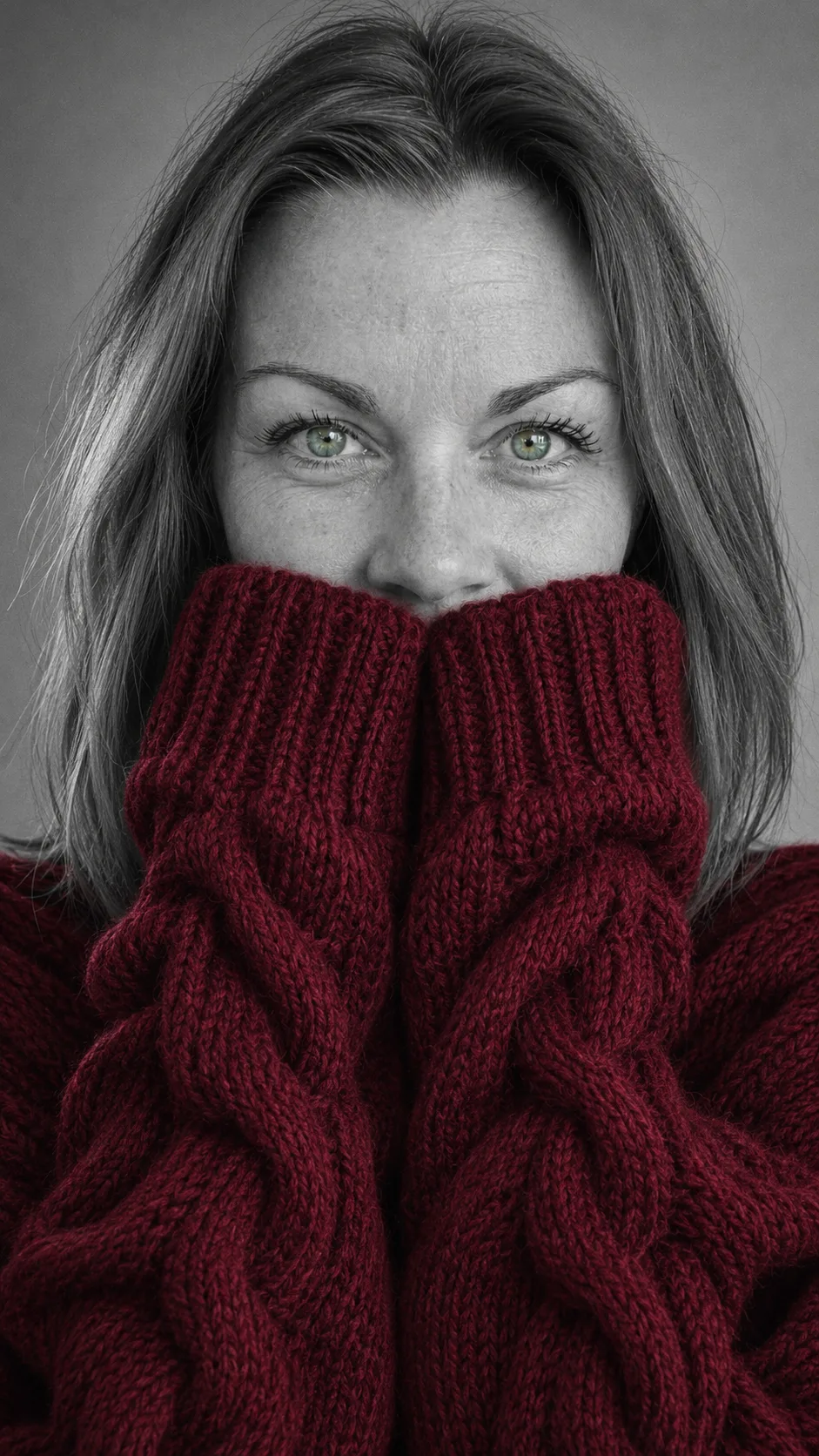
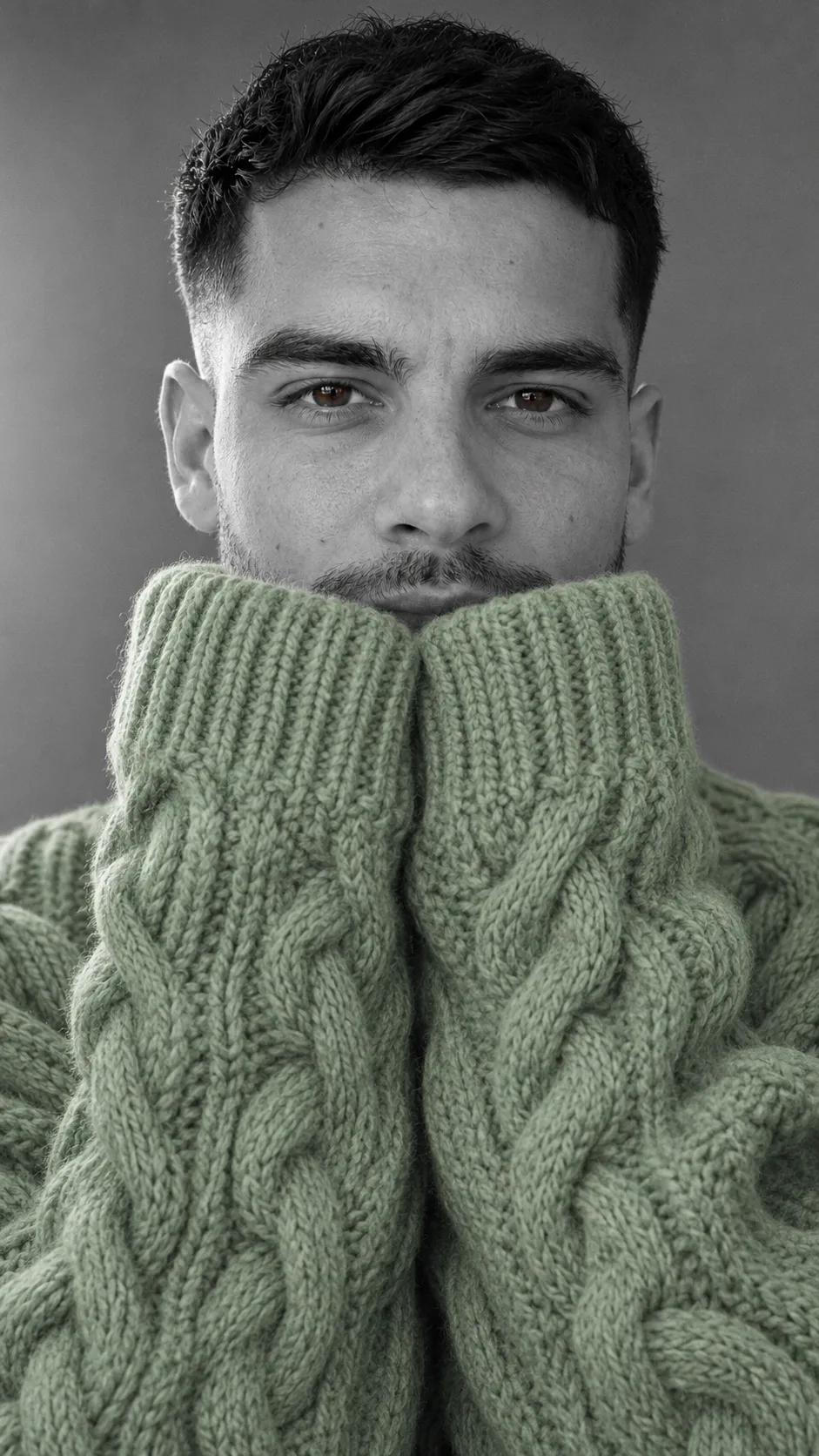
A copper-haired woman in burgundy and a man with stubble in sage, grey everywhere else.
Both people are AI-made adults, not customers. Each portrait came from the selfie on its card, made with GPT Image 2.5 Flare as a vertical 9:16 image, the same way you make yours here. Drag the bar to compare, then press Use this color to pick that shade in the maker.
Before
After
Image only
Burgundy sweater
Before: a selfie of a woman with straight, shoulder-length copper hair, green eyes and a black tee. After: a black-and-white portrait on a grey backdrop with a burgundy cable-knit sweater; her eyes stay green and her freckles still show. The sleeves cover her mouth and chin up to just under the nose, no fingers in sight.
Made with GPT Image 2.5 Flare · vertical 9:16 imageUse this color
Before
After
Image only
Sage green sweater
Before: a selfie of a man with a short cut faded at the sides, short beard, brown eyes and a white tee. After: same cut and beard in grey, a sage green cable-knit sweater and brown eyes still in color. The cuffs reach his lips: the mustache shows and the mouth is almost hidden.
Made with GPT Image 2.5 Flare · vertical 9:16 imageUse this color
Upload a sharp chest-up selfie, pick a color, set Image Size to 9:16 for a vertical picture like the samples, then press Generate image. There is no prompt to paste; the effect already has one.
The button shows the credit cost before you create, based on the site's current settings.
1
The selfie
One person, chest up, facing the camera and a window in daylight. Keep your eyes open and in focus, no sunglasses, no hand on your face: the AI needs your whole face before the sleeves cover your mouth. Hair, beard and skin texture come from your photo. Only upload photos of yourself or of an adult who said yes.
2
The color
Pick Burgundy, Sage green, Cherry red or Royal blue. Want a different shade? Upload your selfie in Image and ask for a sweater in that color.
3
Create and download
Press Generate image and wait for the portrait. Press Download to save it; if the eyes or the sleeves came out odd, run it again with the same photo.
A shared TikTok prompt; the first post with it is from November 9, 2026, and #aisweatertrend showed up two days later.
ChatGPT has no sweater feature: people paste the text into the chat. Nearly every post comes from the US, a handful from Canada. Details via makeviral.ai.
01
The prompt
November 9: @rkshedd posts the earliest version found with the full prompt, tagged #christmas, #red and #green. On the 10th, @shakeishahunter7 shares a red one with the prompt in the caption (1,056 plays by November 12), and @tonilynne83 posts the prompt the same day.
02
The hashtag
November 11: #aisweatertrend appears. A purple take by @dar.starr28 becomes the most liked result post, at 2,278 plays and 305 likes by November 12.
03
The tutorial
November 12: a green-screen walkthrough by @fashionablenerd hits 18,454 plays and 798 likes on day one.
A strong shade; cream nearly vanishes in grey. Red started it, purple sits behind the most liked post, and burgundy or green look polished.
The buttons cover Burgundy, Sage green, Cherry red and Royal blue. For purple, pink or anything else, upload your selfie in Image and name the sweater color.
Bold colors
They stand apart from the grey and show up most in the posts.
Cherry red: the shade the trend opened with.
Purple: the color of the most liked #aisweatertrend post.
Royal blue: cool and loud against black and white.
Burgundy: a deeper red, as in the first sample.
Soft colors
They work when the shade has some depth; a very pale knit reads close to white.
Sage green: calm and polished, as in the man's sample.
Pink, emerald or mustard: all seen in the posts.
Your eye color: some people match the sweater to their eyes.
Cream: the weakest pick, almost white in a grey photo.
Why the chatgpt sweater portrait keeps your eyes in color
The prompt keeps your natural eye color while the sleeves hide your mouth, so your eyes carry the likeness and are the only color besides the sweater.
The eyes
With the mouth and chin under the knit, people know you by your eyes. That is why the effect asks for sharp eyes looking into the lens in their own color: in the samples, her green eyes and his brown eyes stay in color on a grey face.
The right photo
If the eyes look like someone else's, swap the photo for a sharp, front-facing one with open eyes and window light, then run it again. Watch for three other slips: color leaking into the lips or a necklace, odd fingers under the sleeves, and sleeves covering more than the mouth. Each fix is a fresh run.
A November 2026 TikTok trend, also called the ai sweater trend: a selfie becomes a black-and-white portrait where only a chunky sweater is in color, the long sleeves cover the mouth and the eyes keep their real color.
Is it a ChatGPT feature?
No. It started as a prompt people copy into ChatGPT. Here you skip the copying: upload a photo, pick a color, press one button.
Why do my eyes stay in color?
The effect keeps your natural eye color on purpose. In the final image only the sweater and your eyes have color; skin, hair, lips and backdrop go grey.
The eyes don't look like mine. What now?
Use a sharp, front-facing selfie with your eyes open and no sunglasses, then generate the portrait again.
How much does a portrait cost?
The credit cost is on the button before you create, based on the site's current settings.